I have a confession.
For years, there was one question from clients that I dreaded:
"Can customers add engraving for $15?"
Or gift wrap for $5. Or a name on a cake. Or a photo on a mug.
And every time, I had to say some version of: "Squarespace can't really do that. We can fake it with variants... or you could move to Shopify."
I hated that answer. I move people TO Squarespace so they can run their own website without calling a developer. Telling them to leave over one missing feature felt wrong.
The last straw was a client with a small shop who wanted customers to type a name for engraving and pay a little extra for it. I spent an afternoon trying every workaround I knew. At the end of it I thought: why doesn't this just exist?
So my studio built the thing I kept wishing existed. It's called OptionKit, and it's out now.
What Is OptionKit?
OptionKit is a plugin that adds product options with prices to Squarespace stores.
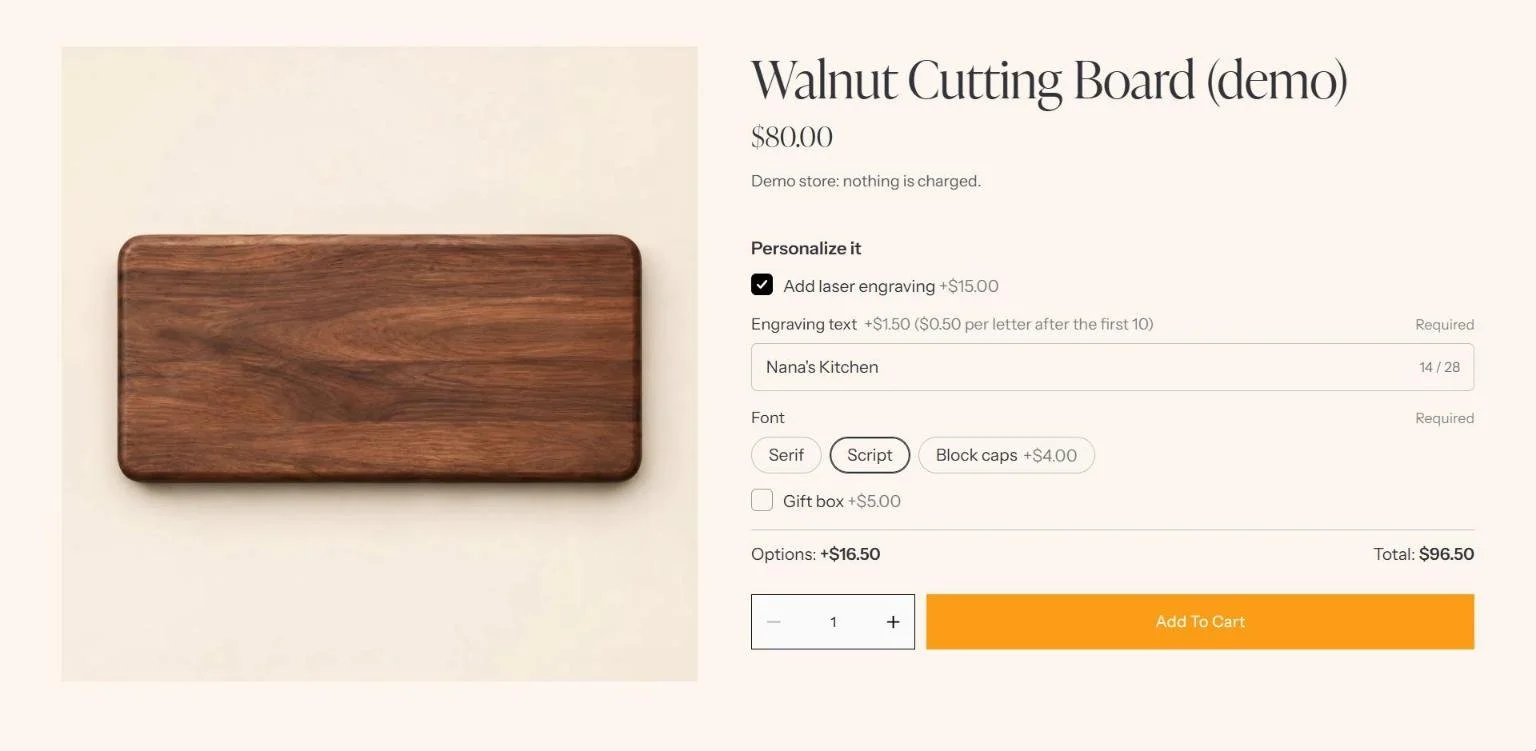
Your customer picks what they want on the product page. The price updates as they go. And then they pay for all of it in your normal Squarespace cart and checkout.
It lives under a new sister brand to Clementine called JuiceKit. (Yes, we stuck with the fruit theme. 🍊)
What Can You Add to a Product?
There are seven kinds of options, and you can mix them on one product:
Text field: "Name to engrave." Free, a set price, or priced per letter.
Text box: A longer gift message or special instructions.
Checkbox: "Add laser engraving, +$15."
Dropdown, buttons, or color swatches: "Frame: Oak, Walnut, Black." Each choice can have its own price.
Quantity: "Extra candles, $0.75 each."
File upload: A photo, a logo, or a design file sent with the order.
Info text: A note between options, like "Made to order: ships in 2 weeks."
And a few things that make it feel polished:
Options can show only when they apply. The font choice only appears after "Add engraving" is checked.
You can set limits, so nobody orders a 90-letter engraving.
It matches your site. Options use your template's fonts and colors, on phones and computers.
How Does It Charge for Options?
This is the clever part, so stick with me.
Squarespace can only charge for products. So each option with a price becomes a small product in your store, like "Laser engraving, $15," on a page that isn't in your menu. OptionKit creates those for you.
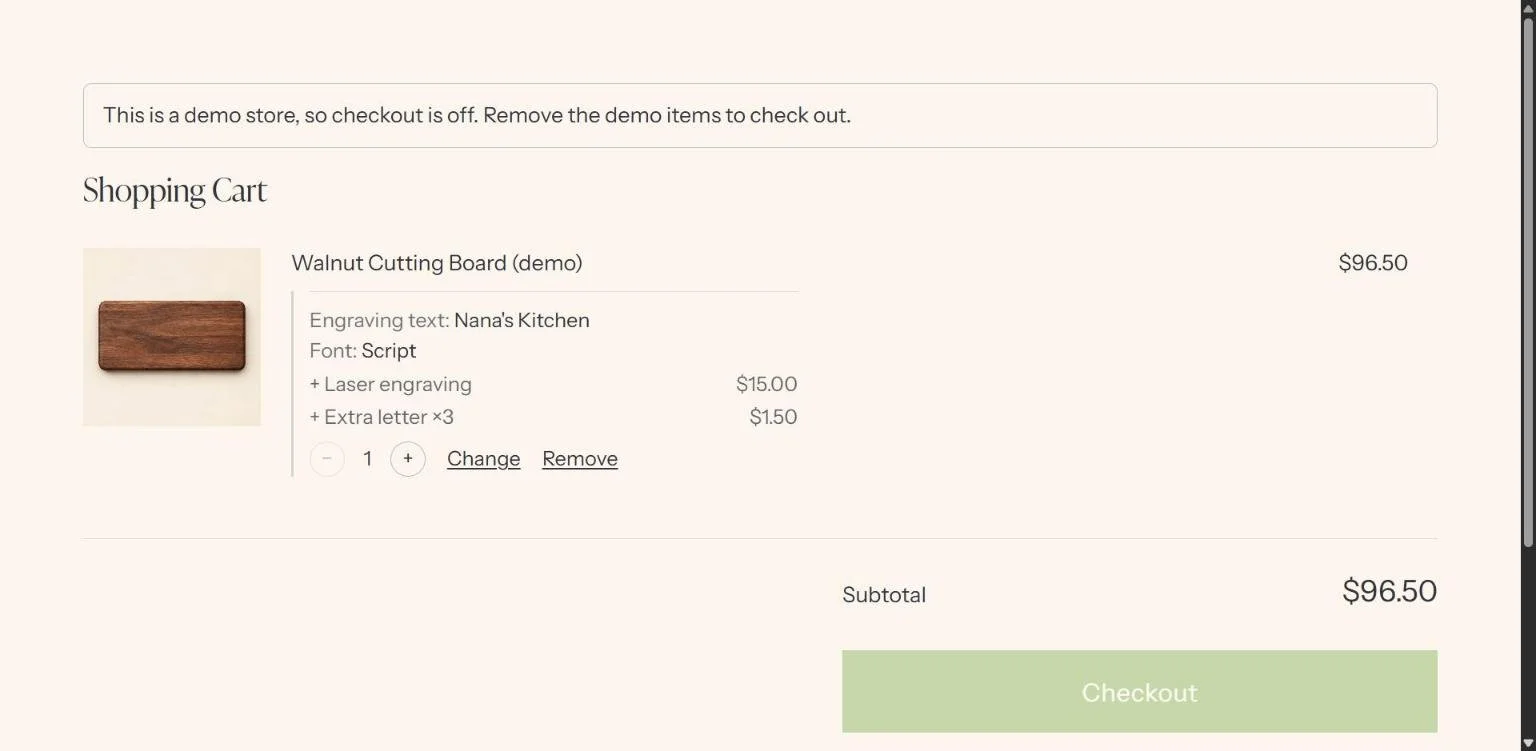
When a customer adds a cutting board with engraving, OptionKit adds the engraving to the cart in the same click.
Squarespace does the rest - the cart, discount codes, taxes, checkout, the order, the email. Nothing about your checkout changes.
On the order, you see exactly what each customer chose, right next to the item it belongs to. So two boards with two different names stay two clear jobs.
Who Is It For?
Anyone on Squarespace 7.1 who sells something customers personalize:
Engravers and woodworkers (see the engraving setup)
Bakeries (custom cakes)
Florists (flowers)
Framers and print shops (framing)
Embroiderers (monograms)
How Long Does Setup Take?
About half an hour. There's no code to write.
Build your options. Start from a template like Engraving or Custom cake, with a preview right next to it.
Connect your store. Paste one line into Squarespace's Code Injection, once.
Publish. Your options are on your store in about a minute.
After that, every change is one click. Nothing to paste again.
What Does It Cost?
Free on your site's squarespace.com address, for as long as you like. Build and test everything.
Free for 14 days on your own domain, with no card.
Then $12 a month or $120 a year per store.
There are no per-order fees and no limits on products or options. One $15 engraving pays for the month.
What It Doesn't Do (Yet)
I'd rather be upfront:
It's for Squarespace 7.1. It doesn't work on 7.0.
You need a plan with Code Injection. That's Core, Plus, or Advanced, or an older Business or Commerce plan.
No live preview on the product photo yet. Customers see their choices and the price update, but they don't see their text on the photo. That's coming soon.
Try It
The fastest way to understand it is to play with it. Try the live demo store here - check a box, type a name, upload a photo, and watch the price change.
Then try OptionKit free on your own store.
Final Thoughts
I built this because I needed it for my own clients. Now, when someone asks "can customers add engraving for $15?", I finally get to say yes.
If you'd like OptionKit set up for you, or you want a whole store designed around it, book a free consultation. I'd love to see what you're selling.