

Most bakeries on Squarespace take custom cake orders the same way: a form on the website, then an email with a quote, then an invoice. It works, but every order takes a few emails before anyone pays.
There are three ways to set up a custom cake order form on Squarespace. I'll go from the simplest one to the one that takes payment up front, so you can pick what fits how you work.
What to ask on a cake order form
Whichever way you build it, the questions are about the same. Here's a cake order form template you can copy:
Date needed, and whether it's pickup or delivery
Size, or how many people it needs to serve
Cake flavor, filling and frosting
Message on the cake
Colors or theme, with a photo if they have one
Allergies or dietary needs
Name, phone and email
Keep it short. Every extra question is one more reason to give up halfway through.
Option 1: A form on a page
This is the classic bakery order form. Add a form block to a page, add the fields above, and Squarespace emails you each order. Form blocks have a file upload field, so customers can attach an inspiration photo.
A form collects the order, but not the money. You reply with a price and send an invoice, which you can do from Squarespace on any plan.
Good for: wedding cakes and anything fully custom, where you need to talk before you can give a price.
Option 2: A product with a form attached
If your cakes have set prices, sell them as products. Customers pay when they order, and there's no invoice to chase.
Add the cake as a product in your store.
Use variants for anything that changes the price, like size. Each variant can have its own price.
In the product editor, go to Forms, click Add, then Create new form.
Add your questions, like the message on the cake, the date and any allergies. Turn on Required for the ones you can't bake without.
The form pops up when the customer clicks Add to Cart, and their answers show up on the order and in your order email.
There are two limits. The form can't change the price, so you can't charge more for red velvet or a longer message unless you make each one a variant. And this kind of form doesn't have a file upload field.
Good for: a set cake menu with a few sizes and no paid extras.
Option 3: Options with prices on the cake's page
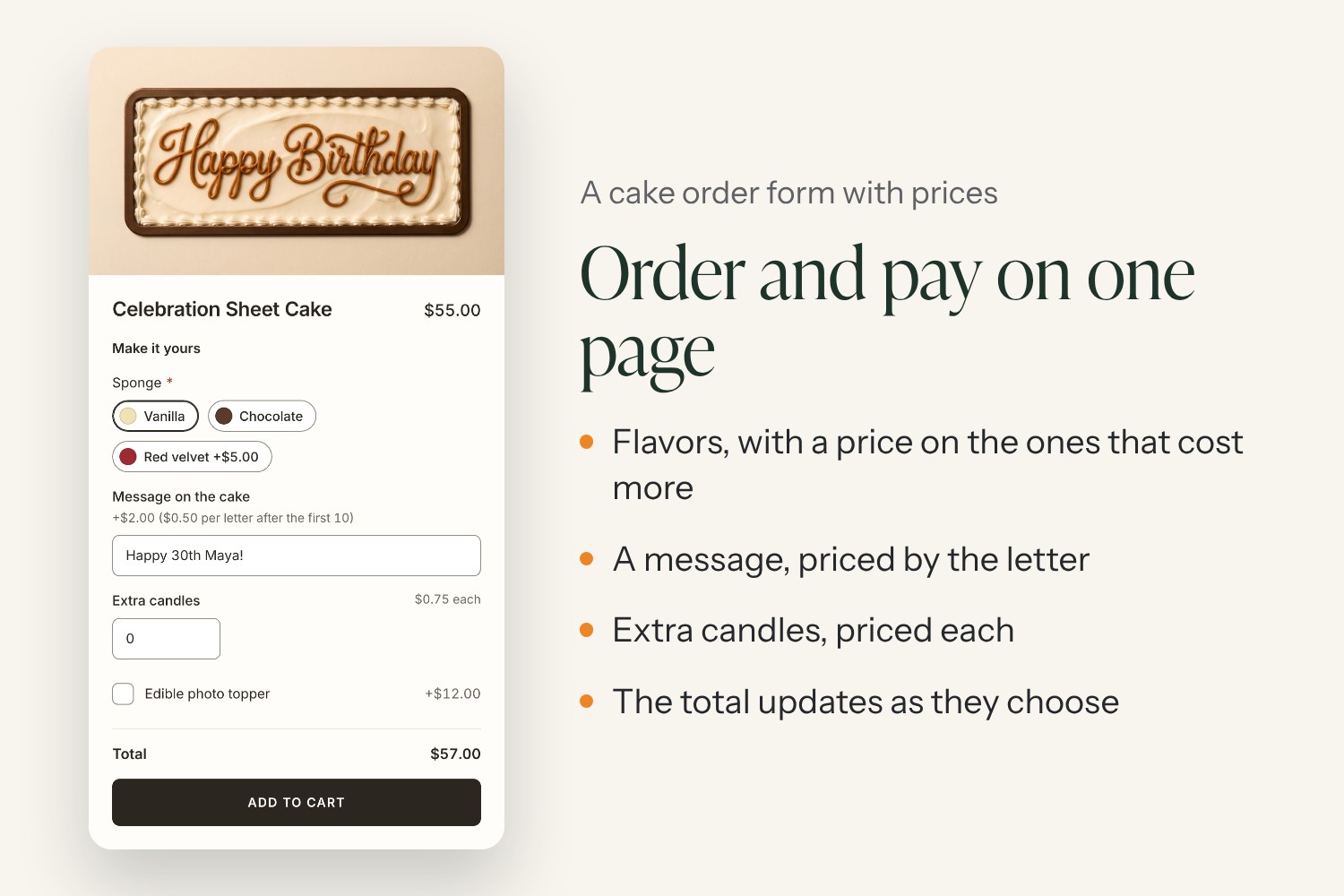
This is the one that works like a real order form and takes payment for everything at once. It's also the one that needs a plugin, because Squarespace can't put a price on an option by itself.
I built OptionKit for this. On the cake's own page, the customer picks everything and watches the total update:
Flavors, with a price on the ones that cost more, like red velvet for $5 extra
A message priced by the letter, with the first few letters free if you like
Extra candles, priced each
A photo upload for an edible photo topper
Then they pay in your normal Squarespace checkout, and the order shows the flavor and the message for your kitchen.
What it doesn't do: pickup dates and time slots aren't part of OptionKit. A short text field for the date works, or you can keep a simple form for the date alone.
OptionKit is $12 a month per store, and it's free to build and test on your squarespace.com address. It's installed with Code Injection, so it needs the Core plan or higher.
Good for: a cake menu where extras cost extra.
Which one should you use?
You don't have to pick just one. Products work well for the regular menu, and a form still makes sense for wedding cakes and anything unusual.
Pickup dates and how many cakes you can take
Two things trip bakeries up here.
First, Squarespace's local pickup option doesn't let customers choose a pickup time at checkout. Ask for the date in your form, and say on the product page how much notice you need.
Second, you probably can't make an unlimited number of cakes. Set the product's stock to what you can take on, and Squarespace will mark it sold out when you're full. Stock is one total, not a number per day, so update it as your calendar fills up.
Frequently asked questions
Can a Squarespace form take payment?
A form on a regular page collects the order but not the money. To take payment with the order, sell the cake as a product and attach a form to it, or add options with prices to the product page.
Can customers upload a photo with their cake order?
Yes, on a form block on a regular page. The form attached to a product doesn't have a file upload field, so for a product you'd need a plugin like OptionKit.
Can I charge by the letter for a message on a cake?
Not with Squarespace's built-in tools. OptionKit can price a message by the letter, with a number of free letters first.
Can customers choose a pickup date and time?
Not at checkout. Squarespace's local pickup doesn't let customers schedule a time, so ask for the date in your order form.
Conclusion
If every cake is a conversation, a form and an invoice is fine. If you have a menu, sell from it, and let customers pay when they order. You'll spend less time on email, and nobody has to wait on an invoice.